
Docs it retrieves. Rules it never forgets. A moat competitors can’t copy.
Upload your product docs, research, and data for RAG-grounded drafts, then set standing Memory: facts, rules, and preferences the writer always applies, every time, without you repeating yourself. Already told ChatGPT or Claude your brand rules? Import them in one paste.
Built for teams that cannot afford a leak
Generic AI content is a commodity. Grounded AI content is a moat.
When every team in your category is using the same foundation model, the content stops being a differentiator. The articles, landing pages, and thought leadership all start to sound identical, because they’re pulled from the same public web.
Source: anything Google has indexed
Same training data. Same blog roundup. Same paragraphs your competitors are also publishing this week.
Source: documents only your team has
Your KB feeds every draft with first-party context: uncopyable, defensible, unmistakably yours.
The only way to win is to write from knowledge other teams don’t have. Your product docs. Your research. Your customer conversations. Your proprietary data. The GazeSEO Knowledge Base makes every AI draft pull from exactly that: your specific, defensible, first-party context.
What you know that no one else does is the story worth writing. GazeSEO makes it writable.
Already taught ChatGPT your brand rules? Don’t start over.
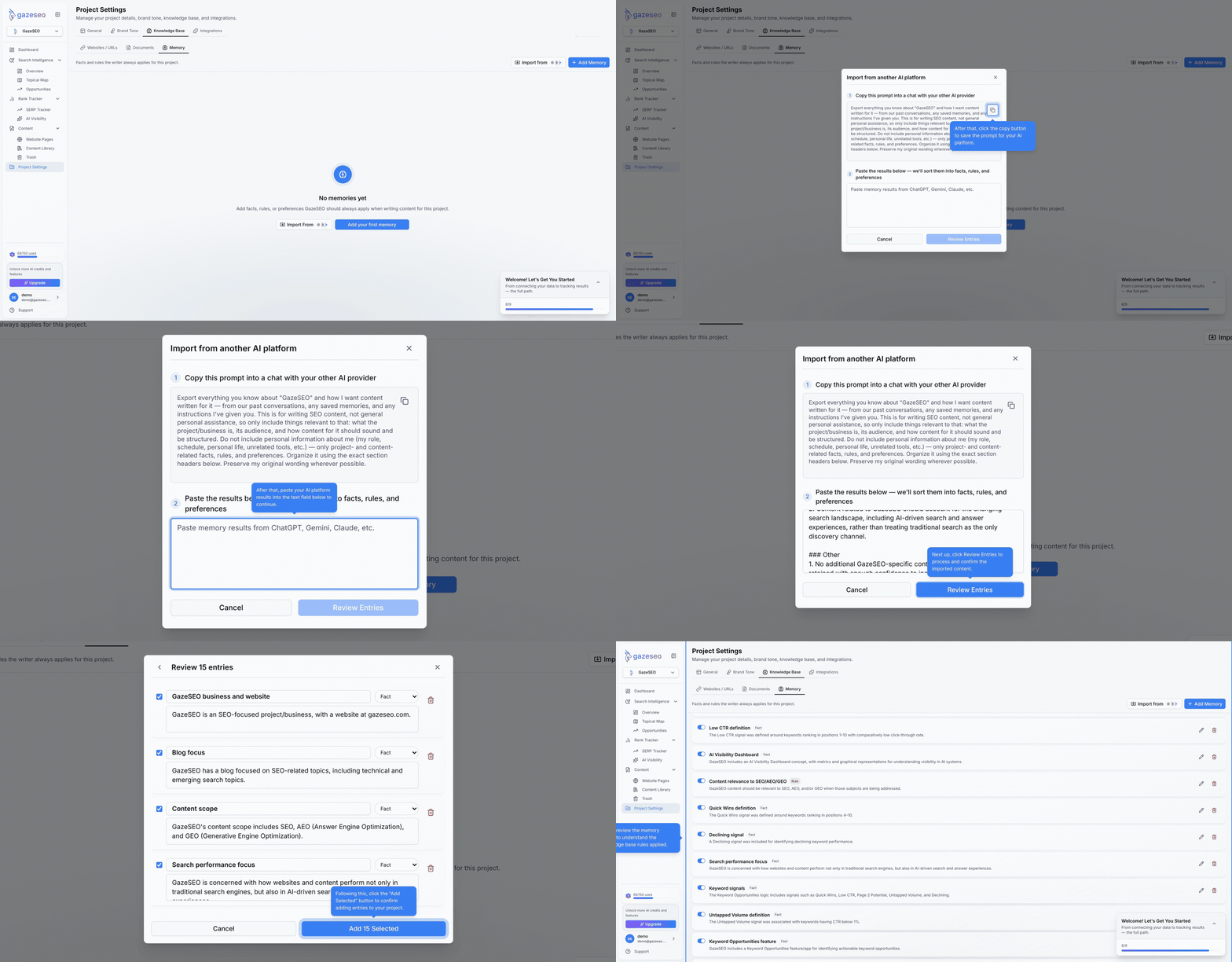
Ask ChatGPT, Claude, or Gemini what they remember about your project, brand voice, or content rules. Paste the answer into GazeSEO and it’s parsed into individual facts, rules, and preferences you can review, edit, and save, in one pass instead of typing them out again by hand.
- 1Ask your AI tool
Prompt ChatGPT, Claude, or Gemini to export what it remembers about your project in a structured format.
- 2Paste it in
Drop the export into GazeSEO’s Import Memory dialog. No reformatting required.
- 3Review and save
GazeSEO parses it into individual fact, rule, and preference entries. Edit or discard anything before saving.
What the AI Knowledge Base does.
Upload, retrieve, cite, secure, and stay current. Five jobs, one private index that powers every AI feature in GazeSEO.
Ingests everything useful
Upload PDFs, Word docs, Google Docs, Markdown files, spreadsheets, and web URLs. Connect Notion, Google Drive, SharePoint, and Confluence. GazeSEO indexes the content, chunks it intelligently, and makes it retrievable by every AI feature in the platform.
Retrieves the right context
When the AI Content Agent or Writer drafts a section, GazeSEO retrieves the most relevant passages from your Knowledge Base using semantic search and reranking. The model generates from your real context, not from what the web guessed was true two years ago.
Cites every claim
Every AI-generated paragraph shows the Knowledge Base sources it was grounded in. Editors can click through and verify in seconds. Unsupported claims get flagged instead of silently slipping into the draft.
Keeps your data private
Your Knowledge Base lives in a private, segmented index tied to your workspace. It isn’t shared with other customers. It isn’t used to train third-party foundation models. Enterprise plans support private deployment and customer-managed encryption keys.
Stays current automatically
Connect live sources (a Notion space, a docs site, a Google Drive folder) and GazeSEO keeps the index in sync. When your product changes, your AI content stops being out of date the day it ships.
Every doc and page, indexed and retrievable.
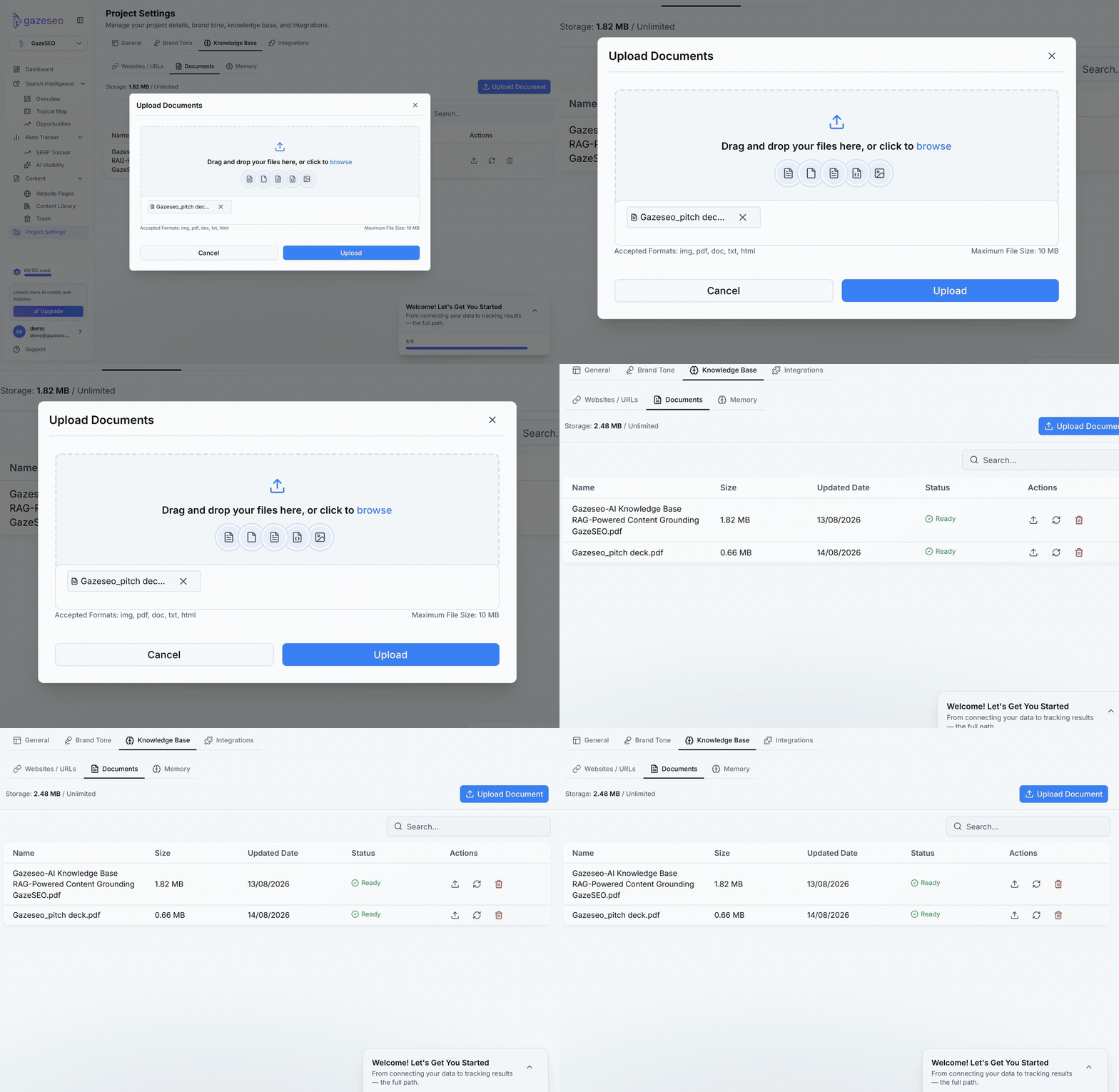
Upload files, paste URLs, or connect a live source. GazeSEO indexes and chunks everything, so retrieval stays precise as your knowledge base grows.
What is RAG, and why does it matter?
RAG (Retrieval-Augmented Generation) is the technique of grounding AI output in specific, retrieved source material at the moment of generation. Instead of asking a model to produce an answer from its training data, you give it the exact passages it needs first.
RAG is the difference between a draft that’s plausible and a draft that’s true. It’s also the difference between content that reads like every other AI article and content that teaches the reader something only your team could.
Without RAG
Models generate from internal, static training data. Facts drift, stats are outdated, product details are wrong, and “plausible” quietly becomes “incorrect” the closer the topic gets to your specific product.
- Static training cutoff
- No access to your private docs
- Plausible-sounding hallucinations
- Nothing to cite
With GazeSEO’s Knowledge Base (RAG)
Every draft starts by retrieving the passages from your docs that relate to the section being written. The model then generates from those passages. The result: drafts that are current, specific, cited, and unmistakably yours.
- Live retrieval from your private index
- Generates from your real passages
- Inline citations on every claim
- Unsupported claims flagged, not invented
What teams put in their Knowledge Base.
The corpus that makes your content uncopyable: product truth, customer voice, proprietary data, and the language your team has already approved.
Product and engineering docs
Keep your product pages, release notes, and technical blog posts aligned with how the product actually works, because your Knowledge Base is the source of truth.
Customer research and interviews
Case study transcripts, interview notes, and support tickets. Let the Writer draft from the real voice of your customers, not from a generic “pain point” template.
Proprietary data and benchmarks
Reports, benchmarks, survey results, and analytics dashboards. Produce data-led content where every stat is cited from your own research, not recycled from an industry blog.
Positioning and messaging
Value prop docs, positioning statements, messaging houses, and launch narratives. Every landing page and solution brief stays on-message automatically.
Compliance and legal
Regulated industries can upload approved claims and compliance language. The Knowledge Base becomes the guardrail: nothing gets said that isn’t pre-approved.
How to set up your Knowledge Base.
From a fresh workspace to grounded drafts in an afternoon. No data team required.
- STEP 01
Create a Knowledge Base
Name it by brand, client, or product line.
- STEP 02
Upload or connect sources
Drag files in, paste URLs, or connect Notion, Google Drive, Confluence, or SharePoint.
- STEP 03
Tag and organize
Apply tags by content type, topic, or recency so retrieval stays precise.
- STEP 04
Test retrieval
Ask the Knowledge Base a question and inspect which passages it surfaces.
- STEP 05
Write
Every AI feature in GazeSEO now pulls from the Knowledge Base by default.
- STEP 06
Maintain
Set freshness rules, review prompts, and let connected sources stay in sync automatically.
Built for teams that cannot afford a data leak.
Tenant-isolated, training-locked, role-controlled, audit-ready. The privacy layer behind every retrieval.
Your Knowledge Base lives in a segmented index, scoped to your workspace only.
Your documents and prompts are not used to train third-party foundation models.
Role-based permissions per Knowledge Base. Control who can read, edit, or retrieve.
SOC 2 Type II controls available. GDPR-ready data processing.
Private deployment and customer-managed encryption keys available on enterprise plans.
Full logs of who uploaded, edited, retrieved, and cited every document.
Frequently Asked Questions
Common questions about the AI Knowledge Base, ingestion, grounding, privacy, and multi-brand setups.
An AI knowledge base is a structured, retrievable collection of your documents, data, and written material that AI systems can use as grounded context during generation. GazeSEO’s AI Knowledge Base is built specifically for content teams, and every draft produced in GazeSEO can be grounded in your private knowledge.